

Join the queue by QR
The walk-in entrance to your queue is a rotating QR code on a paired kiosk screen. Scanning it with any phone camera opens a mobile web page in your branding where the client picks a service, confirms, and gets a ticket. No app is needed; sign-in depends on your workspace policy. This page walks through that flow as your client experiences it.
Prerequisites
- A live branch with a paired kiosk showing the rotating QR (Register at the kiosk).
The flow
The client scans the QR with their phone camera. Entry codes are short-lived by design (the kiosk's on-screen QR visibly refreshes before its expiry, within 30 seconds), so a stale code — an old screenshot or a slow scan — opens a page saying the QR has expired and asking the client to scan again; nothing is issued. Each valid opening establishes a separate visitor flow, valid for ten minutes by default. Sign-in and retries keep that original deadline; they do not renew entry. Several visitors can scan the same current screen code and receive separate flows.
What happens next depends on the branch's QR entry mode (chosen at go-live):
Single QR — the page lists the branch's services, in the order you configured, each card showing the service name. The client taps one.
Per-service QR — the code already names the service, so selection is skipped and the ticket is issued immediately on a valid scan. (If that service has since been removed from the branch, the page falls back to the full service list instead.)
In single-QR mode a confirmation step follows before anything is issued: the selected service, the client's language, and — when the live figure is available — the estimated wait. If the live figure cannot be fetched, the page says availability information is unavailable and the client can still proceed.
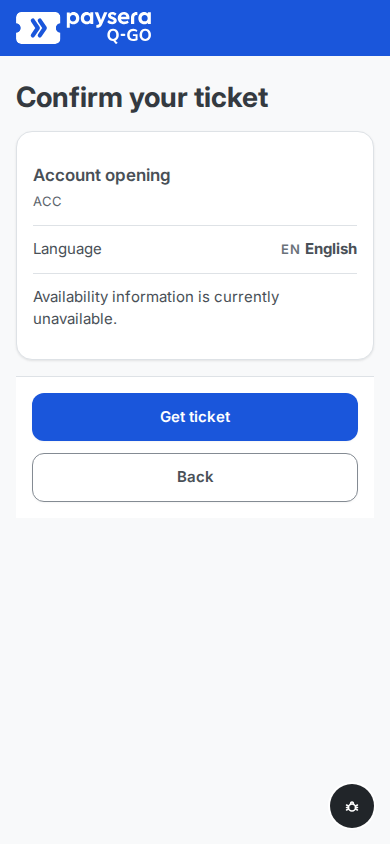 Open full-size screenshot (new tab)
When your workspace collects self-declared details, this screen also carries a collapsed preferred operator picker, defaulting to "Any available" — the choice is a soft preference for matching, never a hard lock.
The client taps Get ticket. A ticket is issued on the spot — the service's ticket letter plus a number, like
A020— and the phone lands on the live ticket page. Back instead returns to the service list with nothing issued.
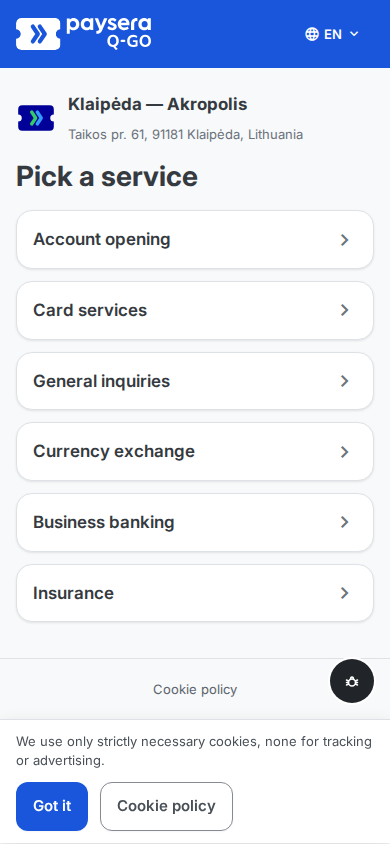
Result
The client is in the queue, holding the live ticket page — their single touchpoint until they are called. The link keeps working if the phone locks or the browser closes: reopening it shows the same live ticket, no sign-in needed.
Common problems
- "QR code expired — please scan again" — the client opened a stale code (an old photo or a slow scan), or their entry flow expired. Scanning the current kiosk QR again fixes it.
- "You already have an active ticket" — in workspaces where clients sign in with verified identity, one active ticket per client is the rule; the page links straight to the existing ticket.
- The page says the location is closed — the date is a holiday or closure at this branch (see Holidays and closures); clients cannot join on a closed date. Outside working hours on a normal day the page works as usual — clients can join, they are just not called until the branch opens.